虛擬環境的好處
- 6月 08 週六 201909:54
在pi上用conda管理python虛擬環境
虛擬環境的好處
- 6月 07 週五 201915:15
在Raspberry Pi 3 樹莓派安裝OpenCV(Python 3) use miniconda
https://medium.com/@lin7lic/%E5%9C%A8raspberry-pi-3-%E5%AE%89%E8%A3%9Dpython-3-opencv-34c9740d78e4
- 1月 17 週四 201919:43
Raspberry Pi Stepper Motor Control with L293D
Quick Reference NEMA size 17 1.8° 2-phase stepper motor(參考手冊)
https://reprap.org/wiki/NEMA_17_Stepper_motor (簡單規格)
Step Motor 42BYGH47-401A (規格),
- 1月 08 週二 201917:24
python and GPS
https://towardsdatascience.com/how-tracking-apps-analyse-your-gps-data-a-hands-on-tutorial-in-python-756d4db6715d
- 11月 27 週二 201816:33
Dash Application Design: MVC Pattern
資料參考:https://alysivji.github.io/reactive-dashboards-with-dash.html (frameware,good)
Big Data Analytics with Pandas and SQLite in Python
https://datacarpentry.org/python-ecology-lesson/09-working-with-sql/index.html
https://sqlitebrowser.org/
https://medium.com/a-r-g-o/using-plotlys-dash-to-deliver-public-sector-decision-support-dashboards-ac863fa829fb (another porject)
Big Data Analytics with Pandas and SQLite in Python
https://datacarpentry.org/python-ecology-lesson/09-working-with-sql/index.html
https://sqlitebrowser.org/
https://medium.com/a-r-g-o/using-plotlys-dash-to-deliver-public-sector-decision-support-dashboards-ac863fa829fb (another porject)
- 11月 22 週四 201810:53
python & Flask Web framework example

資料來源: Control of your Appliances and IoT Devices at your Fingertips with Flask
Connecting to your database
https://dzone.com/articles/restful-web-services-with-python-flask
- 11月 22 週四 201809:55
PYTHON AND FLASK
參考資料:http://dreamingecho.es/blog/internet-of-things-with-python-and-flask
Tutorials For IoT-Makers
Tutorials For IoT-Makers
- 11月 22 週四 201807:55
Raspberry 常用指令
Raspberry 常用指令
(1) How to set up WiFi on your Raspberry Pi without a keyboard or monitor (or ethernet)
(1.1) Put the Raspbian SD card into your computer
(1.2) cd /Volumes/boot
(1.3) Add your wpa_supplicant.conf file
Create a file in this directory called wpa_supplicant.conf. The file should contain the following details:
network={ ssid="YOUR_NETWORK_NAME" psk="YOUR_PASSWORD" key_mgmt=WPA-PSK }
With this file in place, Raspbian will move it in /etc/wpa_supplicant/ when the system is booted.
(1.4) Put your SD card in the Raspberry Pi, boot, and connect
(2) Raspberry Pi 3 B and B+ - How to Configure Wi-Fi and Bluetooth
Now you need to add your Wi-Fi settings to the wpa-supplicant configuration file. Type the following in the command line to the configuration file: sudo nano /etc/wpa_supplicant/wpa_supplicant.conf.
Go to the bottom of the file and add the following Wi-Fi setting, adding your setting in the quotation marks.
network={
ssid="The_ESSID_from_earlier"
psk="Your_wifi_password"
}
(1) How to set up WiFi on your Raspberry Pi without a keyboard or monitor (or ethernet)
(1.1) Put the Raspbian SD card into your computer
(1.2) cd /Volumes/boot
(1.3) Add your wpa_supplicant.conf file
Create a file in this directory called wpa_supplicant.conf. The file should contain the following details:
network={ ssid="YOUR_NETWORK_NAME" psk="YOUR_PASSWORD" key_mgmt=WPA-PSK }
With this file in place, Raspbian will move it in /etc/wpa_supplicant/ when the system is booted.
(1.4) Put your SD card in the Raspberry Pi, boot, and connect
(2) Raspberry Pi 3 B and B+ - How to Configure Wi-Fi and Bluetooth
Now you need to add your Wi-Fi settings to the wpa-supplicant configuration file. Type the following in the command line to the configuration file: sudo nano /etc/wpa_supplicant/wpa_supplicant.conf.
Go to the bottom of the file and add the following Wi-Fi setting, adding your setting in the quotation marks.
network={
ssid="The_ESSID_from_earlier"
psk="Your_wifi_password"
}
- 11月 22 週四 201806:22
Hello World ! Flask
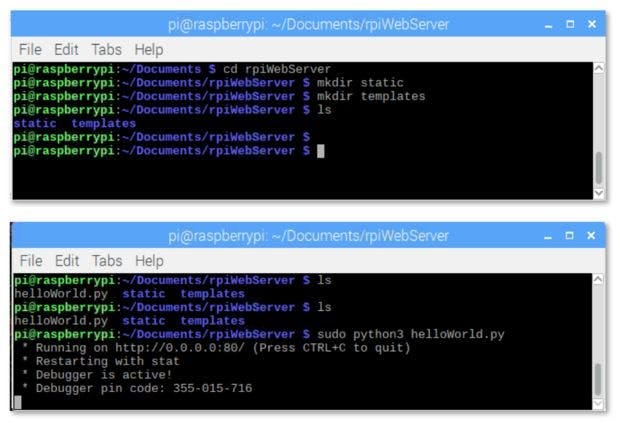
參考資料:
(1) https://www.instructables.com/id/Python-WebServer-With-Flask-and-Raspberry-Pi/
(2) https://medium.com/@rovai/python-webserver-with-flask-and-raspberry-pi-398423cc6f5d
(1) Installing FLASK and Setting Your RPi WebServer
1
